Posts

Cosmos Status Code 400 - SubStatus Code 1004

When calling Cosmos DB via Gateway Mode and you get a HTTP 400 status code, the Cosmos DB Gateway is telling you the request contains invalid data or is missing required parameters.     A sub status code 1004 means that the query is not support cross partition.   Cosmos DB can run partitions (as defined by the partition key) on multiple nodes in the region, however some queries can’t be executed on sperate nodes and then combined in the response.   For example queries with Order By, Top, District, Offset, Limit and Group by require the data from this separate nodes to be evaluated together.   To solve this issue, do the aggregate, ordering and grouping at the client after the data is return.   Or target just a single partition with queries that contain this syntax. {6230289B-5BEE-409e-932A-2F01FA407A92}

GraphQL on GitHub: a fragment for aggregated repo data

GitHub provides the GraphQL explorer to play with GraphQL data and learn how to shape your queries. When your group of queries grows to the point of repeating objects and their fields, its time to move to fragments.  A fragment in GraphQL allows you to have: readability - a well-named fragment shortens queries and mutations reusability - reuse fragments in queries and mutations performance - on the client, fragments and their components are a cache layer type-safety -  the  code generator  that builds your GraphQL SDK includes named fragments so you can access any deeply nested objects as fragments without the types and their guards you would need to manage Typical places to create and use fragments to DRY up your GraphQL queries include the most common schema objects. For a GitHub GraphQL schema, those can include the User and Repository . To get the entire list of repositories in a GitHub org, you need to compensate for the cursor/paging as well as the ret...

Migrate Azure Scheduler jobs to Azure Functions

Migrate a code-based Azure Scheduler job to Azure Functions Recently, I migrated a scheduled job from .NET Framework 4.6 to .NET Core and from Azure App Service to Azure Functions. This was part of a larger effort to move to .NET Core, and the retirement of a dependency of Azure Scheduler jobs .  While there is nothing wrong with .NET Framework 4.6 or Azure App service, the project was moving toward separate, smaller, quicker deployments for the various projects instead of a single monolithic deployment. Existing scheduled job: Add feature flags Add the ability to control you job with a feature flag. In your Azure App service, create a feature flag for every scheduled job. This can be as simple as an App Configuration setting with a value or you can use Azure App Configuration.  Add code for the feature flag and make sure it has a default value if it isn't detected in the environment.  Add logging statements to report your runtime feature flag value.  Deploy the code...

Entity Framework 6 won't save (update) an entity returned from Stored Procedure

Symptom The issue was that code that previously worked, update property then save, wasn't working any more. The application is a .NET 4.6 Web API project using Entity Framework 6.  Issue The fix isn't in the code which saved (updated) the entity, but was caused because the entity that is updated isn't correctly formed by the Stored Procedure. Before the SP was added, the entity was returned from EF directly.   Fix After the stored procedure completes, refetch the entity using straight Entity Framework code such as ` await TwitterAccounts.FirstAsync(table => table.TwitterHandle == twitterHandle); ` where TwitterAccounts is a table in the EF Context.  Step to debug issue: capture save result The original EF code to save didn't capture the returned int of number of rows changed.  Before account.IsProperty = true; _context.SaveChanges(); return OK(); After account.IsProperty = true; int result= _context.SaveChanges(); if(result==0) { throw new Exception("proper...

Convert GoDaddy PEM certificate to PFX certificate to use in Azure App Service

 When you purchase GoDaddy certificates, you should get 3 files: *.crt file *.pem file *-key.txt file 1. Change the key file's name to the key extension so any future tools can find it by its extension. 2. If you download and/or open the key file on a Windows computer, your key file may now have the wrong encoding. Use a bash terminal and the  iconv CLI tool to convert to the correct encoding in a new file with a " 2 " added at the end of the filename to indicate the different file: iconv -c -f UTF-8 -t ASCII your-domain-name.key > your-domain-name. 2 .key 3. Convert to the PFX format with the openssl CLI tool: openssl pkcs12 -export -out your-domain-name.pfx -inkey your-domain-name. 2 .key -in your-domain-name.crt 4. You need to enter a new password when creating the PFX. Remember the password, you will need it when you add your certificate to Azure App Service.   5. In the Azure portal, for your App Service, select TLS/SSL settings.  6. Add a new TLS/SSL ...

Oct 2021 - Copy an Azure SQL Database to dev computer

There are several blog posts on this site answering how to copy an Azure SQL database. Since they are older or in some cases lost (Wayne's Microsoft blog posts are gone), I'll link to the Microsoft docs.  Enterprise data or functionality? Don't use these processes if you need change detection or other enterprise-level requirements. Copy the Azure SQL database and keep it in the cloud. Make a copy of your Azure Cloud database To copy an existing Azure SQL Database in the Azure portal, you can copy or export. Generally, I choose to export to Azure Storage Blob container as a bacpac file . This allows me to use it as either a cloud or local database. The bacpac file includes data and schema. Watch for export completion To watch for export completion, from the Azure Server (not database) in the portal, use the  Import/Export History in the Data Management section. Download bacpac file from Azure Storage To download the bacpac file, Azure Storage container in the Azure portal...

Azure Functions + System.Text.JSON Deserialize exception

If you run into a System.IO.FileNotFoundException exception from the Azure Function when it is deserializing JSON with System.Text.Json to your class, make sure you are not using System.Text.Json 5.0.2.  Issue FileNotFoundException: Could not load file or assembly 'System.Text.Encodings.Web, Version=5.0.0.0, Culture=neutral Fix Downgrade to System.Text.Json 5.0.1.  Project description The issue was found while moving code from a working .NET Framework 4.6.1 web api project into a .NET Core 3.1 class library, which is called from an Azure Function 3. The deserialization happens in the class library. The manual and automated testing described in the post were both local to my development machine, not on the Azure Cloud. Initially it was tested by the Azure Function manually. Later, as I thought the issue was about the JSON returned, I added automated programmatic tests to call into the class library in a separate test project. The test project worked so the issue had to be the A...

Create Azure DevOps Pipeline for React App deployment to Azure app service

 Disclaimer: All opinions in this post are mine and not my employer (Microsoft). If you know of a more correct or performant way to accomplish work discussed in this post, please let me know at email javascript-developer@outlook.com . Many projects I work on are in progress by the time I work on them. I can't change previous design or architecture choices, but just solve a specific technical issue.  Secrets stored in Azure Key Vault All secrets for the React app are stored in Azure Key Vault. These secrets need to be pulled from Key Vault and set into the environment so that the `npm build` script uses those values. In order for the Azure DevOps Pipeline to connect to Azure Key Vault, you need to complete some work before you develop your Pipeline: Create a Key Vault and store your React build secrets, such as an Azure Functions key, used to authenticate and use the Function. Your secret doesn't have to have the same name as your React build variable. Please don't try. Ke...

Moving database from Azure SQL to localdb

I recently moved an Azure SQL database back to a local development database and ran into a few issues. I took these notes so that they might help the next person that hits the problem. In my local SSMS, I use the Import/Export wizard with the datasource using SQL Server native client 11.0. This moves the tables and data. Any destination tables will not have IDENTITY as the source tables did.  Solution # 1  Move away from INT Identity to use GUIDS. This requires work in the database and client code but is the better choice if you need to move data out of the source datatabase then back into the source database.  Solution #2 More immediate fix to get past the block that your inserts don't autoincrement.  Steps: The following steps are completed in SSMS in the destination (local) database and should have all the data but not the IDENTITY column. Rename the mytable to mytable2. Generate CREATE, INSERT, and SELECT scripts for the table. Modify the CREATE script to use the...

Node.js, npm, yarn, & those lock files

The following is my opinion and doesn't represent my employer.  Install Node.js If you are like me and work across operating systems and environments (local, container, cloud), you have one or two bullet-proof ways you install Node.js. The Node.js organization has done a great job of listing those.  I'm sticking with the following: * For Windows installations - use the Windows download .  * For all other installations, including VM, Container, Mac, *Nix - use the bash script Never, under any circumstances, use the apt or apt-get package manager to install Node.js. At this point, that is equivalent to a code-smell.  NPM vs YARN NPM should be your package manager of choice when installing an NPM package. If you run into problems, log an issue .  Debugging Node.js projects with NVM and lock files The Node Version Manager (nvm) and lock files are for the developer of a project to be able to get back to an exact version of the entire development environment to debug ...

Hosting front-end applications on Azure

Image
I have a catalog of small front-end Javascript apps built with Angular (ng) and React (CRA and Next) I would like to host on Azure. Hosting on Azure Azure provides features for a web host: * Options from big to small - full VM , container , web app , or host static website * HTTPS and URL - every Azure resource is served via HTTPS with a dedicated URL - no need to buy a certificate or domain name until needed. No Configuration changes In order to reduce hidden problems, each front-end app should be installed and running with no configuration change away from the development environment such as a to change the routing of assets from absolute to relative, or folder and subfolder naming. Consistent & immediate deployment Once the app is ready to deploy as a collection of static files, there shouldn't be a need to spend time preparing the hosting environment. The front-end system deployment steps should be consistent regardless of which front-end framework the proje...

OSS @Microsoft - Docs

Open source software (OSS) at Microsoft allows everyone to see, comment, and contribute to the products, services, documentation, sample code, and SDKs they use. I work at Microsoft and my opinions are my own. The Microsoft documentation set is not a single GitHub repository. It is many repositories, all with active writers, support engineers, and SLAs. When you see an issue in the docs or you think a concept or technique is unclear, GitHub repositories allow you to: Add an issue, via an Edit button , that is sent directly to the Product group or Content Developer.  Create a pull request (PR), that is sent directly to the Product group or Content Developer.  Is this open source though? Absolutely. You can immediately impact all users of the docs in a positive way. 2 things you can do when logging an issue against the docs: Be specific. Your comment is attached to the entire doc. Be specific where in the doc the issue is and what wording, image, or sample cod...

Fetching a Private Key From An Azure Key Vault Certificate

If you create a private certificate in Azure Key Vault and use the fancy features like auto rotation, you might like to be able to fetch the private key from the vault and rehydrate it as a X509Certificate2 class in your C# code. Here is how you do that: KeyVaultClient keyVaultClient = new KeyVaultClient(new KeyVaultClient.AuthenticationCallback(GetToken)); var certificateBundle = await keyVaultClient.GetCertificateAsync(certificateIdentifier); var certficiateSecret = await keyVaultClient.GetSecretAsync(certificateBundle.SecretIdentifier.Identifier); byte[] certificateDecoded = Convert.FromBase64String(certficiateSecret.Value); var certificate = new X509Certificate2(certificateDecoded, password: ""); The Certificate Bundle passed back from the  GetCertificateAsync call has a .Cer property, however that is just the bytes for the pubic key, if you do this: var publicCertificate = new X509Certificate2( certificateBundle.Cer ); The X509Certificate2 instance will onl...

Regex to search VSCode for Azure subscription keys

Image
Before you check in code, make sure the Azure subscription keys are removed or replaced with obvious markers. In VSCode, select the magnifying glass, the select the last icon on the line, "*." indicating the search is by regular expression. Enter [a-z0-9]{32} in the search text box and select enter. The search results appear below the search text box. Scan the results for any highlighted keys that are real key values.

Changing TLS setting for Azure web apps including Bot Framework

Image
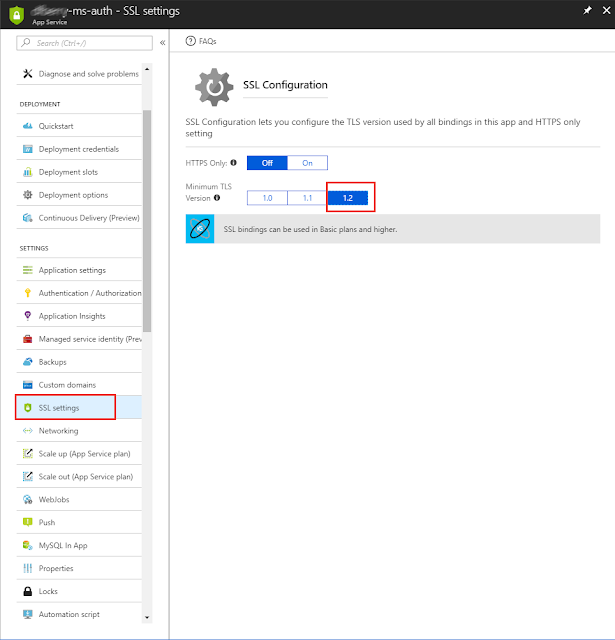
If you need to change the TLS setting for you Azure web apps, including Bot Framework apps, go to the Azure portal. In the left navigation, select All Resources , sort the table by the type column. Any row with the type of app service may need the TLS setting updated based on on the service announcement here . On each service, select the SSL section , and change the Minimum TLS Version .

Community TypeScript conference in Seattle

Seattle is getting its own community-driven TypeScript conference March 12, 2018. Get your tickets now. 

Curl command for Microsoft Cognitive Services product QnA Maker

This is the curl command to send QnA Maker a question and receive the answer: curl -H "Content-Type: application/json" -H "Ocp-Apim-Subscription-Key:<subscriptionKey>" -X POST -d '{"question":"<question>"}' https://westus.api.cognitive.microsoft.com/qnamaker/v2.0/knowledgebases/<appID>/generateAnswer <subscriptionKey> found on https://www.qnamaker.ai/UserSettings <appID> found in url when view app, ?kbid=<appID> <question> question such as "How do I ...?"

Debug mocha.js with VSCode

This is my cheat sheet for debugging the mocha.js project from VSCode while adding fixes to it. This is not about how to debug ANY project that is using mocha for testing. The mocha.js repository has a build system that builds into /bin/mocha. I don't use a package.json script. I just use a launch.json mocha test configuration: { // Use IntelliSense to learn about possible attributes. // Hover to view descriptions of existing attributes. // For more information, visit: https://go.microsoft.com/fwlink/?linkid=830387 "version" : "0.2.0" , "configurations" : [ { "type" : "node" , "request" : "launch" , "name" : "Mocha Tests" , "program" : "${workspaceFolder}/bin/_mocha" , "args" : [ "--colors" , "${workspaceFolder}/test/reporters/dina.spec.js" ], "internalConsoleOptions" : "openOnSessionSta...

Paperspace.com for Windows 10 Desktops in the cloud

I recently needed a clean Windows 10 desktop for testing purposes. I couldn't use Docker, Vagrant, VirtualBox or any of the other local-to-my-computer VM solutions. I tried the Amazon Workspaces solution but it had the typical UX of 30 questions I don't know the answer to. I just wanted a desktop that could download from the Internet. Paperspace.com to the rescue! Within 5 minutes I had a Windows 10 desktop in a browser and the hardest questions where how much CPU and ram I wanted. The cost was incredibly inexpensive too. The test only took 10 minutes and I destroyed the cloud machine after that. This was the easiest, fastest, and cheapest solution to the problem.

SQL Server AAD Authentication Error

Are you seeing this error from your ADO.NET Code Trying to Connect To Your SQL Server via Active Directory Authentication: Exception=System.Data.SqlClient.SqlException (0x80131904): Failed to authenticate the user NT Authority\Anonymous Logon in Active Directory (Authentication=ActiveDirectoryIntegrated). Error code 0x800703FA; state 10 Illegal operation attempted on a registry key that has been marked for deletion.  The issue might be that you are running a windows service or a scheduled task with a user that has logged off. In Windows Server the registry hive for the current user is loaded when the user logs into the machine, and unloaded when they log off. This means that if you service account is running under a user that is logged off then the registry hive will not be available. ADO.NET AAD in .NET 4.6.1 uses the registry hive of the running user -- which could be the user of a service. To solve this problem you need to tell Windows Server not to unload the regi...