Posts

Showing posts with the label Visual Studio

Removing SYSPRO Business Object Dependencies

Image
Summary Recently I was assigned the task of removing all dependencies on SYSPRO business objects inside an Asp.Net 2.0 application. These are the steps to find underlying SQL calls made by the business objects.    SYSPRO Business Objects SYSPRO Business objects are contained in the Interop.Encore.dll. The returned result is XML for the calls I dealt with.   The data items were, eventually, pulled out of the XML and used as single data points or as lists. You may choose to return XML from the new SQL calls you write.  This allows you to plug in the results and leave the rest of the legacy code.   Since the purpose of my task was to find any and all speed improvements, I removed the XML and dealt directly with SQL results. This required more data layer build-up but the benefit, beyond speed, was that I learned exactly what data was required and how it was ultimately used since I had to reverse engineer all the way to the level of usage.  ...
How to convert SVG data to a Png Image file Using InkScape

Image
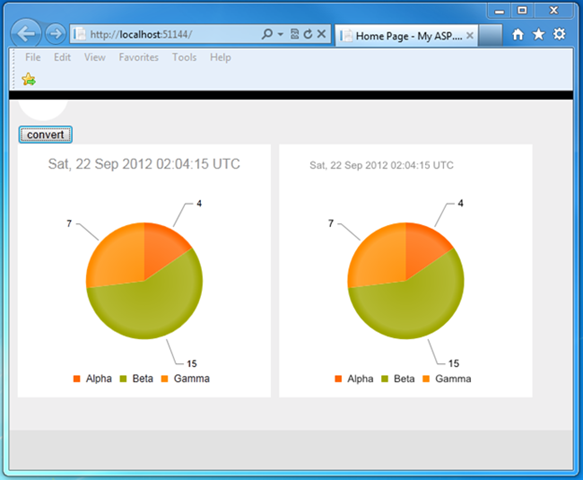
Introduction The project required the need to put the visual pie chart on a web page on the client and in a Pdf file created on the server. I eventually choose to use a Telerik Kendo DataViz Chart control on the client, and use a PNG file on the server for the Pdf file. This blog post will explain the process and code to convert the client-side pie chart Svg data to a Png file, and provide a download to the working code. Prerequisites You need to have a trial version of the Telerik Kendo library installed in order to make the sample code work. You also need InkScape installed. InkScape is the application that does the actual conversion. You will need to change the Web.config appSetting of “ExeDirectoryForInkscape” to represent your own installation location. Any SVG Data Will Work The pie chart was created using the Telerik Kendo DataViz chart control. While I name a specific control, as long as you have access to the SVG data, the same conversion process on the server will...

Restyling an Html <SELECT> Element from a Telerik Kendo Panel Bar

Image
Introduction Recently, I needed to restyle an HTML <SELECT> box so that the selected element had a different background color. In all other ways, the element could be exactly like an HTML <SELECT>. Below are both the original element, and the restyled element.     This type of style change allows the novice user to immediately identify the control’s implied usage while allowing for some coordination with the site and page’s overall style.   Technology Platform The project is an Asp.net MVC site with jQuery, and Knockout.js on the front-end requesting json content on the backend. For the purposes of this blog post, I’ve stripped down the functionality so that just the required elements are visible. The project was already using Telerik Kendo controls so morphing the Kendo Panel Bar into a <SELECT> element was suggested. The main work is in the css file but the entire working sample project is available for download.   Telerik ...

Steps for Consuming XML data in .Net

Image
Introduction While consuming third-party RSS feeds, I found I had to relearn how to deal with XML data. This post is meant to prepare any developer who needs to consume XML which they do not control. While I used RSS feeds, any XML will apply. I wanted to change the meta data and data of the XML file into a model of data that I could control with .Net classes and conventional data storage.   This post is organized to take you from an xml file to .Net classes able to consume, serialize, and test the xml. Generating an XSD file from an XML file using Xsd.exe The first step is to make sure you have the XML Schema Definition tool, xsd.exe , installed. It is part of the .Net Framework tools . Make sure the executable location is part of the system path , user path, or command prompt path. On my computer the path is “C:\Program Files (x86)\Microsoft SDKs\Windows\v7.0A\Bin” and I added it to the system path so it is available at any command prompt, regardless of the user.   Se...

Combining Multiple Azure Worker Roles into an Azure Web Role

Image
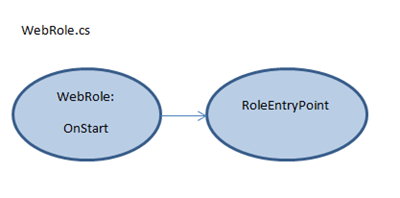
Introduction While working on apps.berryintl.com ’s web service, it appeared from the Windows Azure project templates that I might need several worker roles because they cycle at different times. One worker needed to cycle every day. The other needed to cycle every five minutes. Since the work and the cycle rate were very different, it felt “right” to isolate each role. In this post, I’ll show you how I combined multiple worker roles into a single, underutilized Azure web role thereby keeping the concept and design of worker roles while not having to pay extra for them. In order to verify the solution, the project uses Azure Diagnostics Trace statements. The solution file is available for download . Combining Multiple Azure Worker Roles into an Azure Web Role Currently, I use a small Azure instance and there isn’t enough traffic to justify a separate worker role. I implemented Wayne ’s process for combining one worker role with a web role a while back. Now I needed to add anot...

Code Faster Review and Favorite Tips

This review covers “ Coding Faster: Getting More Productive with Microsoft Visual Studio: Covers Microsoft Visual Studio 2005, 2008, and 2010 ” by Zain Naboulsi and Sara Ford .   Why I Ordered the Book I ordered this book with the hopes of getting some quick and easy speed improvements to my coding style. If you are looking for just such a shortcut key primer, the poster address for all languages is available.  [ Alternative link to posters ] This book covers a bit more and takes a little more time to digest. That’s not bad.   Who should Buy this Book As a huge, feature-rich product with numerous versions, mastering Visual Studio is a challenge in itself. I must admit I tend to focus more on the language and SDKs of the current project, and less on the IDE. Sitting down with the book gave me time to correct that. If you have any desire to master your Visual Studio coding environment, buy this book .   Book Layout The book is organized with seven c...

Unit Test Initialization and Cleanup for Windows Azure Storage Emulator

My unit tests add and delete entities from local Windows Azure dev storage,  at their most basic. If the Azure Storage emulator isn’t started, the tests don’t fail quickly – they just sit there acting like the test framework is hung. In order to ensure that the tests proceed, I needed to make sure the emulator was started before the tests ran.   I started with code found in this thread on StackOverflow . I needed to make sure the Storage Emulator is started before the test classes are called and that the emulator is shut down when the tests are done. I wrote this class and added it as a separate file to my test assembly.   More information about CSRun.exe and the Process class are available in MSDN .   // ----------------------------------------------------------------------- // <copyright file="AssemblySpecific.cs" company="BerryIntl"> // Berry International 2011 // </copyright> // ----------------------------------...

Simple WP7 Mango App for Background Tasks, Toast, and Tiles: Code Explanation

Image
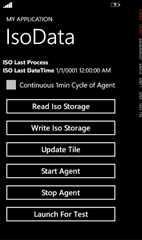
This is a continuation of this post , explaining how the sample app works. Caution : This sample isn’t meant as an example of best patterns and practices. If you see something in the code you would never do, then don’t. Solution File Organization The app has three Visual Studio Projects: the app, the agent, and the shared code library between them. One of the great things about Mango is that now the built-in Visual Studio Unit test functionality is available. By separating out the meat of the work into the SampleShared project, I can also focus my unit testing there. SampleApp1 The app has a MainPage, a ViewModel, and the WMAppManifest.xml file modified to note my ExtendedTask of BackgroundServiceAgent. The Agent is extremely simple with a call to the shared library, an update to the Tile, and a call to pop up Toast. The meat of the work is in the SampleShared library. The AgentMgr manages the background agent : add, remove, find, run now. It is only called f...