Posts

Showing posts with the label Ajax

How to convert SVG data to a Png Image file Using InkScape
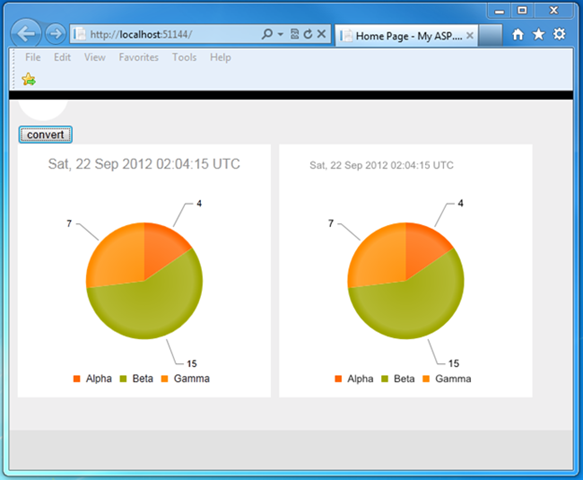
Image
Introduction The project required the need to put the visual pie chart on a web page on the client and in a Pdf file created on the server. I eventually choose to use a Telerik Kendo DataViz Chart control on the client, and use a PNG file on the server for the Pdf file. This blog post will explain the process and code to convert the client-side pie chart Svg data to a Png file, and provide a download to the working code. Prerequisites You need to have a trial version of the Telerik Kendo library installed in order to make the sample code work. You also need InkScape installed. InkScape is the application that does the actual conversion. You will need to change the Web.config appSetting of “ExeDirectoryForInkscape” to represent your own installation location. Any SVG Data Will Work The pie chart was created using the Telerik Kendo DataViz chart control. While I name a specific control, as long as you have access to the SVG data, the same conversion process on the server will...

Restyling an Html <SELECT> Element from a Telerik Kendo Panel Bar

Image
Introduction Recently, I needed to restyle an HTML <SELECT> box so that the selected element had a different background color. In all other ways, the element could be exactly like an HTML <SELECT>. Below are both the original element, and the restyled element.     This type of style change allows the novice user to immediately identify the control’s implied usage while allowing for some coordination with the site and page’s overall style.   Technology Platform The project is an Asp.net MVC site with jQuery, and Knockout.js on the front-end requesting json content on the backend. For the purposes of this blog post, I’ve stripped down the functionality so that just the required elements are visible. The project was already using Telerik Kendo controls so morphing the Kendo Panel Bar into a <SELECT> element was suggested. The main work is in the css file but the entire working sample project is available for download.   Telerik ...

Using XMLHttpRequest.getResponseHeader to get Json Response Headers in jQuery

Introduction While developing a web page with a summary graph and a detail grid below, I needed to pass a small amount of data outside of the existing Json call data sets. I also wanted to do this without another asynchronous call back to the server. I wound up stuffing the data in a custom http response header while already on the server. This article explains how I retrieved the data on the client. Existing Client Libraries Both the graph and the grid were independent jQuery libraries with very specific Json response requirements. Stuffing the small amount of data in one of those response data sets could have been done with enough tinkering but I wasn’t sure how this would affect those libraries now or in future versions. While the data was related, it was also separate and I wanted the code design to reflect that. Server Http Response Stuffing This project uses Asp.Net MVC 4. The code to add the small amount of data should be the same across the .Net platform: HttpCon...

Last Update For a Set Of Rows In SQL Server

I am displaying a gridview (table) of rows from the SQL Server and want to refresh the page when anything in any of the rows changes. One thing I always do when I create a new table is add a non-null timestamp column to the table called LastUpdate. I can use this column to figure out if any of the rows has changed with this Transact-SQL: SELECT MAX(LastUpdate) FROM T1 Since the timestamp column automatically gets larger (across the whole database) when there is an UPDATE or INSERT the MAX(LastUpdate) will always be bigger if there is a row added or updated on T1. But what about Deletes? Imagine we have this table: Id LastUpdate ------------------------------------ ------------------ FEB5F896-4F2E-47C9-AA63-0001C63CD3DC 0x00000000018F4590 6692BBC4-E3C7-4B9A-B8DC-00035CAD4D00 0x0000000001913542 018483F7-7EA1-4F0D-8CD2-0008CF4851F9 0x000000000193D0E0 45CC45AD-A6EB-4E54-B6B5-000AE2DF2E9E 0x00000000018F9161 B770834E-331E-416F-BBA0-000AE722C6...

Mutual Exclusive CollapsiblePanelExtender

The following piece of code will allow you to have multiple ASP.NET 2.0 Ajax CollapsiblePanelExtender controls on a single page and only one of them will be expanded at a time. You can use this to keep the page length short. You must set the BehaviorId of the CollapsiblePanelExtender, that is what the $find javascript function looks for. Make sure to add all the BehaviorIds to the array in the pageLoad function. <script type= "text/javascript" > // WWB: Handles Mutual Exclusive Expansion. Only One Extender Panel // Can Be Open At A Time var extenders = []; function pageLoad(sender, args) { extenders[0] = $find( "PanelExtender1" ); extenders[1] = $find( "PanelExtender2" ); extenders[2] = $find( "PanelExtender3" ); // WWB: Hook All The Extenders, If extenders[i] is null then // the extenders is not being displayed -- i.e. not visible for (var i=0; i< extenders.length; i++) if (extenders[i] !...

Dynamic Javascript in an Update Panel - A Better Way

Image
Last post was about how dynamic javascript in the update panel was not being re-executed on a partial postback.  I have a better way of making it execute -- parse the controls in the UpdatePanel and call the javascript method eval(). Here is the hook: Page.ClientScript.RegisterStartupScript( this .GetType(), "LoadHandler" , "function LoadHandler(){EvalScript($get('" + updatePanel.ClientID + "'),'scriptId');};\r\n" , true ); Page.ClientScript.RegisterStartupScript( this .GetType(), "AddLoadHandler" , "Sys.Application.add_load(LoadHandler);\r\n" , true ); EvalScript looks like this: function EvalScript(control, id) {  if(!control){return;}  for(var n=0;n<control.children.length;n++)  {      if((control.children[n].tagName == 'SCRIPT') && (control.children[n].id == id)){          var scriptElement = control.removeChild(control.children[n]);          ...

Dynamic Javascript in an Update Panel

Image
If you are using an Ajax UpdatePanel in ASP.NET and you have a control that renders javascript, that javascript will not change when on a partial postback.  For example, I have a Repeater control that loops though so GEO points and outputs javascript to add PushPin to a Virtual Earth map.  If a partial postback is called, and the Repeater rebinds it recreates the javascript, however on the client side the ScriptManager just replaces the UpdatePanel innerHTML with then new code.  It doesn't tell the javascript engine to reparse that code and recreate the functions that are being replaced.  To solve this problem I had to write some javascript client code that would parse the return, and move my <SCRIPT> tags to the head of the page.  This "woke up" the javascript engine and the new functions where recompiled. How to hook it up: 1) The first thing to do is to tell the ScriptManager to parse the innerHTML of the UpdatePanel and move all script bloc...

New Code to AJAX

Image
My pet project is a new website. I'm working on the search page which searches through several NetTiers Services in the Component layer. It took me a few hours to figure out exactly what I wanted to do here. Do I user an Object Data Source? User StringBuilder to return an HTML table? What should the gridview link to once the search has been performed? Then I thought, I know I'm just going to AJAX this code. Am I just wasting my time? I just want to get v1 out the door. AJAX can wait to v2 but then I think none of this code would be used via AJAX except the NetTiers stuff. Do you design new websites via AJAX right off the bat? I haven't done enough AJAX to be able to think AJAX as a first pass on the design.