Posts

Showing posts with the label Silverlight

Simple WP7 Mango App for Background Tasks, Toast, and Tiles: Code Explanation
Image
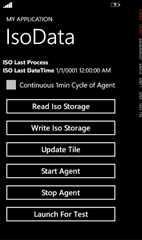
This is a continuation of this post , explaining how the sample app works. Caution : This sample isn’t meant as an example of best patterns and practices. If you see something in the code you would never do, then don’t. Solution File Organization The app has three Visual Studio Projects: the app, the agent, and the shared code library between them. One of the great things about Mango is that now the built-in Visual Studio Unit test functionality is available. By separating out the meat of the work into the SampleShared project, I can also focus my unit testing there. SampleApp1 The app has a MainPage, a ViewModel, and the WMAppManifest.xml file modified to note my ExtendedTask of BackgroundServiceAgent. The Agent is extremely simple with a call to the shared library, an update to the Tile, and a call to pop up Toast. The meat of the work is in the SampleShared library. The AgentMgr manages the background agent : add, remove, find, run now. It is only called f...

A Simple WP7 Mango App for Background Tasks, Toast, and Tiles

Image
Download Binary and Code The .XAP binary and code solution are both available for download . The app uses a background process that does some work then updates the tile and pops up toast. The app and the agent talk to each other via an isolated storage file protected by a named mutex. The diagram below shows the pieces and how they work together. This is the app associated with this post . App/Agent Architecture The app and agent don’t actually talk to a web service as this is a sample but in a real world solution they both would. The app would do the heavy lifting. The agent would have a quick, light conversation with just enough information to update the tile and pop up toast with meaningful information. In this sample, you can configure the agent to run repetitively every minute, second, etc. This is usually done for debug/testing. In the usual release situation, the agent runs on the 30 minute cycle. Start the App Pin the App to the Start Screen Make...

How to create a ChildWindow Login Popup for Windows Phone 7

Image
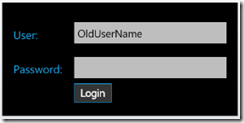
Introduction After struggling with a navigation issue in my app of when to show/go to/return from the Settings page that captured the user name and password, I decided to pop up a window on any page where and when credentials were necessary but not currently known. Since I knew I was going to add more credential-requiring pages in my app, using a popup allowed me to reduce my dependency on navigation silliness between the pages, and have a more encapsulated design.   This post will show you how to pop up a ChildWindow on the app page to grab the user’s login credentials. The control allows the old username and password to be passed into the control so that previous values can appear. The tab order/enter key switches from textbox to textbox to button.     The sample application included in this post just displays the results on the calling page.   Acknowledgements Several other posts helped me along the way:   Jesse Liberty’s video “C...

Dynamic WP7 Charting: Static Resources versus Binding

Image
In my current development project, my MVVM pivot app needed to create a pie chart from a collection of objects. I read David Anson’s ( @DavidAns ) blog about using Charts in Windows Phone 7 (WP7) development. His example uses a detailed Resource Dictionary for the style of the chart. I’m so new to Silverlight that the XAML markup of David’s example tripped me up. This blog post is for other newbies trying to rework static resources into dynamic binding. In Silverlight, static resources are those that are already defined, hence static. This is great for a known set or for working in the Visual Studio Design-time environment. Dynamic resources can only be viewed in the runtime environment where they can also be changed. In this article, I’m using the Silverlight Toolkit, found here . A chart is a parent with child nodes of legend and pieseries. Since the Chart is a parent with several children, I wasn’t sure where to bind my collection of dynamic objects which would determine t...

Silverlight WP7 Change TextBlock Foreground in Item class code

Image
Introduction This post is a result of research I did for my own app project. I needed to change the Foreground color of a TextBlock via code based on the value of a property at runtime. The app is a Windows Phone 7 Pivot app with the default MVVM classes (provided by VS2010 during project creation). I found plenty of explanation and some sample code but couldn't make it work in my own app. I found the WinMilk app  source code on CodePlex and knew that app did something very much like what I wanted to do. Thanks to the app authors for making the code available. Feature Description The data concept was of a collection of Items, where each item has a status and a color associated with that status. The visual concept was a PivotItem with a ListBox. The ListBox is bound to the data collection. The ListBox's StackPanel contains a TextBlock for the Item's Name. The Item's Name needs to change color based on the Item status. Since the object is from a collection, it wasn...

VisualStateManager.GoToState not working?

I’ve had issues with this on and off for a while and thought I should note my solution quickly.   Expression Blend will actually use ExtendedVisualStateManager, but the base class VisualStateManager has this solution as well. Basically, due to a bug that was supposed to be fixed, but for whatever reason still exists, the visual state sometimes won’t change using this method. The GoToState method takes a control, a state name string, and Boolean whether to use transition animations.   The solution is simple. There is another method called GotoElementState that takes a FrameworkElement, and the rest. Just use this instead and your problems go away.   1: // Avoid this. 2: VisualStateManager.GoToState(ctrl, stateName, true ); 3:   4: // Use this. 5: VisualStateManager.GoToElementState(ctrl, stateName, true );