Posts

Showing posts with the label Web

Convert GoDaddy PEM certificate to PFX certificate to use in Azure App Service

 When you purchase GoDaddy certificates, you should get 3 files: *.crt file *.pem file *-key.txt file 1. Change the key file's name to the key extension so any future tools can find it by its extension. 2. If you download and/or open the key file on a Windows computer, your key file may now have the wrong encoding. Use a bash terminal and the  iconv CLI tool to convert to the correct encoding in a new file with a " 2 " added at the end of the filename to indicate the different file: iconv -c -f UTF-8 -t ASCII your-domain-name.key > your-domain-name. 2 .key 3. Convert to the PFX format with the openssl CLI tool: openssl pkcs12 -export -out your-domain-name.pfx -inkey your-domain-name. 2 .key -in your-domain-name.crt 4. You need to enter a new password when creating the PFX. Remember the password, you will need it when you add your certificate to Azure App Service.   5. In the Azure portal, for your App Service, select TLS/SSL settings.  6. Add a new TLS/SSL ...

Hosting front-end applications on Azure

Image
I have a catalog of small front-end Javascript apps built with Angular (ng) and React (CRA and Next) I would like to host on Azure. Hosting on Azure Azure provides features for a web host: * Options from big to small - full VM , container , web app , or host static website * HTTPS and URL - every Azure resource is served via HTTPS with a dedicated URL - no need to buy a certificate or domain name until needed. No Configuration changes In order to reduce hidden problems, each front-end app should be installed and running with no configuration change away from the development environment such as a to change the routing of assets from absolute to relative, or folder and subfolder naming. Consistent & immediate deployment Once the app is ready to deploy as a collection of static files, there shouldn't be a need to spend time preparing the hosting environment. The front-end system deployment steps should be consistent regardless of which front-end framework the proje...

Changing TLS setting for Azure web apps including Bot Framework

Image
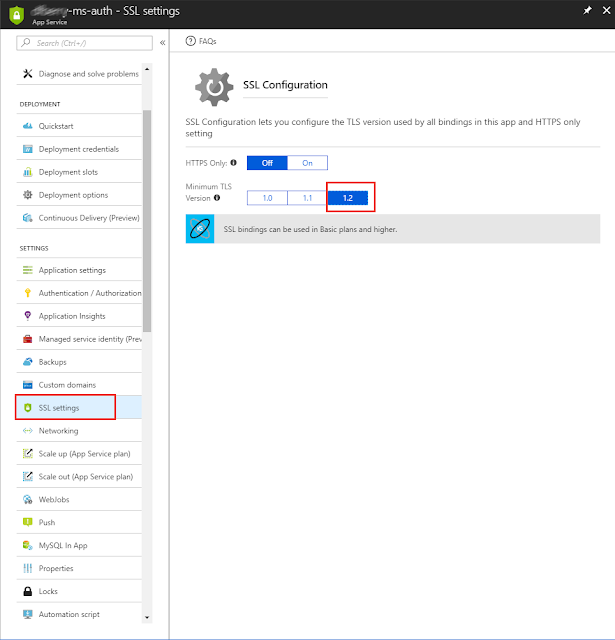
If you need to change the TLS setting for you Azure web apps, including Bot Framework apps, go to the Azure portal. In the left navigation, select All Resources , sort the table by the type column. Any row with the type of app service may need the TLS setting updated based on on the service announcement here . On each service, select the SSL section , and change the Minimum TLS Version .

Extending a linux web dashboard

Image
Adding pm2 status to linux-dash linux-dash is a light-weight, open-source web dashboard to monitor your linux machine or virtual machine. You can find this package on Github . The dashboard reports many different aspects of our linux installation via shell scripts (*.sh). This allows the dashboard to be light-weight, and work on most linux machines. The website displays running charts, and tables. The web site can be node, php, or go. For the node webserver, the only dependencies are express and websocket. Extending linux-dash You may have a few extra services or programs running on your linux installation that you would like to display on linux-dash . I use pm2 , a process manager. Adding a table to display the pm2 status information was very easy -- even if you are not familiar with client-side Angular directives or server-side Node.JS or server-side shell scripts. The naming convention and templating allows us to focus on the few components we need to build without st...