Posts

Doing Tests and Unit Tests of AspForm Web Applications: Setup

Image
This is the beginning of a series of post dealing with AspForm unit tests. We have two options for running Unit Tests. Both have advantages and disadvantages. Running Unit Tests Against your local development Box Running Unit Tests Against a Development Server Gotcha of this approach Recommended Approach Running Unit Tests Against your local development Box A test would be written as shown below This will produce a result such as To have the test work we MUST configure IIS to provide the appropriate site, for example on 666 Check list: Physical Path is pointing to the image you wish to test IIS port and path are matching IIS Server is running Running Unit Tests Against a Development Server Note: You need to STOP the above server for the following to work. Our test is now written as: The  AspNetDevelopmentServerHost must be pointing at the source folder you wish to test. We must now change the Web Application project to be found and ...
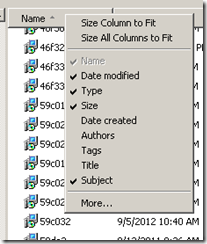
Missed placed your installation MSI and need to move Application to another machine?

Image
I was working away from my home office and my library of MSIs was not accessible. I wanted to install some software on a new machine NOW, instead of waiting until I got home in a few weeks.   I remembered that everything that is installed has a copy of the installation MSI copied to C:\Windows\Installer (so programs can be uninstalled later). looking in this folder, I saw {temp file names}.msi and not the original MSI names – rats!  Wait a minute, the MSI’s likely contains information on what it is in its properties. Left clicking on the file list allows you to select what is displayed. Clicking More… gives you “Subject” which is what I am looking for: Now I see what all of the MSI are! Now, I just copy (NOT move) the desired MSI’s to another folder, and renamed them appropriately.  If you move them, then you will cause problems if you wish to adjust features at a later time.   I can now install the stuff that I want, now!

Android Low Energy Bluetooth or a feature that I would love to see in C#

Recently I have been playing with BLE on Android (Samsung S3). One of the issues is no exposed BLE API in the current version of Android. I said, exposed, because by reflection you can find them! Or at least some of them, in some cases, you need to access the BLE library that was supplied to the phone (but not connected to the Android OS.   The process is very simple to identified the library:   First, add the following to the manifest:   < application android:allowBackup = "true" android:icon = "@drawable/ic_launcher" android:label = "@string/app_name" android:theme = "@style/AppTheme" > < uses-library android:name = "com.broadcom.bt.le" android:required = "false" /> < uses-library android:name = "com.csr.bluetooth.BluetoothExt" android:required = "false" /> < uses-library android:name = ...

Are Android implementations lightweight/superficial?

Recently I found that two feature sets of Android to be seriously lacking. There is also a feeling that other features (motion sensors) are “punt ware”. The biggest short fall has been implementation of Low Energy Bluetooth --- something that runs find on apple devices– is totally lacking. Issue 43473 : Bluetooth Smart (Low Energy) on Android Issue 37525 :android api support for Bluetooth Issue 33371 : Support for Bluetooth 4.0 Low Energy Profile on Galaxy Nexus Recently, I did some work with a friend on Near Field Communications. The Android libraries work – sort of, they allow demo code showing simple operations to be written but fail to fully implement the complete specification.   Recently I have also been working hard to use the motion sensors and found that they work adequately for game play but if you are wishing to use them for internal navigation , there is great angst in code-ville…   Having spent time in Microsoft Developer’s Division of days...

Object-Relational Mapping (ORM) Frameworks–knowing the price tags!

I own Telerik’s OpenAccess ORM, I have consulted professionally on Microsoft Entity Framework, this week I had a long conversation with senior types on Hibernate issues. My experience with ORM or ORM-like implementations, go back to 2001, when I was joined Vision Compass and had to immediately investigate and fix major performance problems. While the C++/SQL Server application was not generated by a ORM tool, the design followed what a ORM tool would produce.   Wikipedia wise, it has been described as “(ORM) is a programming technique for converting data between incompatible type systems in relational databases and object-oriented programming languages. This creates, in effect, a "virtual object database," which can be used from within the programming language. There are both free and commercial packages available that perform object-relational mapping, although some programmers opt to create their own ORM tools.” Humanware wise: the lack of availability of skil...

Facebook: Reducing Advertisements

Image
This post arose from several friends asking for help because the number of ads that were appearing on Facebook almost made it unusable (too much to wade through for the benefit received).  These are normal people and not nerds. The common root cause was doing “Likes” that result in add appearing.  The selling of this feature to business is described here . This is an older problem that was reported by the likes of NBC in stories .  In a recent story , Zuckerberg reports that more and more ads are being done this way.The bottom line is NOT to like anything except actual posts (not reposts or shares or….).  Like People you know posts and not products or firms.   The solution is to be kind to your friends (as shown below), ask your friend to do the same (and if they do not, then you may need to unfriend them if their facebook friendship continues to spam you). You may wish to FORWARD this page to them first…   SPAM because of Friends! If you friends ...

Android getOrientation()

Image
  I spend some time today trying to understand getOrientation()  and found a few notes when I googled, but most of the notes left things fuzzier than needed. The author’s appear to know what they were talking about – but failed to express it with a good clarity…   The documentation states:   getOrientation (float[] R, float[] values) Computes the device's orientation based on the rotation matrix.   Not exactly a rich description! When I attempted to write code, the expected results did not occur….   The core of the code is: SensorManager.getRotationMatrix( rotationMatrix , null , accelVals , magVals ); SensorManager.getOrientation( rotationMatrix , orientationVals ); textView1 .setText( " 0:" + orientationVals [0]+ " 1:" + orientationVals [1]+ " 2:" + orientationVals [2]); Where the values are supplied by (I’ve omitted the code for stabilizing the values) @Override public void onSensorCh...