Posts

Combining Multiple Azure Worker Roles into an Azure Web Role
Image
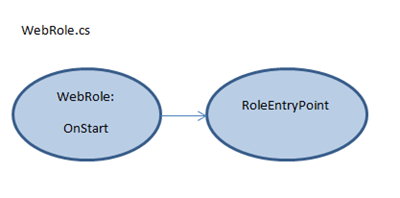
Introduction While working on apps.berryintl.com ’s web service, it appeared from the Windows Azure project templates that I might need several worker roles because they cycle at different times. One worker needed to cycle every day. The other needed to cycle every five minutes. Since the work and the cycle rate were very different, it felt “right” to isolate each role. In this post, I’ll show you how I combined multiple worker roles into a single, underutilized Azure web role thereby keeping the concept and design of worker roles while not having to pay extra for them. In order to verify the solution, the project uses Azure Diagnostics Trace statements. The solution file is available for download . Combining Multiple Azure Worker Roles into an Azure Web Role Currently, I use a small Azure instance and there isn’t enough traffic to justify a separate worker role. I implemented Wayne ’s process for combining one worker role with a web role a while back. Now I needed to add anot...

Updating My Resume

The new preamble to my resume:   I piss excellence. Bill Gates retired from Microsoft only when I promised to work there. I don’t version my code because it only needs a single iteration. Intel optimizes their hardware to match my compiler – not the other way around. My code comments have won a Pulitzer Prize. My current code style will be consider a best practice in two years—at that time I will think it is obsolete. The programing languages that I don’t know I haven’t invented yet. I don’t submit to source control – it submits to me. Since I have never introduced a bug to the code base, my hiring can put the testing department out of work. I don’t require an office chair -- I levitate in front of my desk. My specifications are printed and bound then read at Mosques along with the Koran. Then they make the New York Times Best Seller list. Christ is the only one qualified to give me a code review. He comes back to earth when I need a code review – which hasn’t been required yet...

Windows Azure Storage Table Names

Image
While writing a unit test for a class that created a Windows Azure Storage table, I named the test table “Test_Function_Date” where Function and Date where replaced with meaningful test information. The underscores in the table name were also there.   Azure CloudTableClient.CreateTableIfNotExist Exception While running the test, my call to CloudTableClient.CreateTableIfNotExist(TableName) threw an exception.     Illegal Table Name Exception Details The outer exception is Exception of type 'Microsoft.WindowsAzure.StorageClient.StorageClientException' was thrown. The inner exception is "An error occurred while processing this request." Buried in the inner exception XML is a status code of OutOfRangeInput, with a message of “ One of the request inputs is out of range .” Since this was a single unit test with not much prep work, I figured out it was the table name.   Azure Table Name Rules The rules for table naming allow: alphanume...

Code Faster Review and Favorite Tips

This review covers “ Coding Faster: Getting More Productive with Microsoft Visual Studio: Covers Microsoft Visual Studio 2005, 2008, and 2010 ” by Zain Naboulsi and Sara Ford .   Why I Ordered the Book I ordered this book with the hopes of getting some quick and easy speed improvements to my coding style. If you are looking for just such a shortcut key primer, the poster address for all languages is available.  [ Alternative link to posters ] This book covers a bit more and takes a little more time to digest. That’s not bad.   Who should Buy this Book As a huge, feature-rich product with numerous versions, mastering Visual Studio is a challenge in itself. I must admit I tend to focus more on the language and SDKs of the current project, and less on the IDE. Sitting down with the book gave me time to correct that. If you have any desire to master your Visual Studio coding environment, buy this book .   Book Layout The book is organized with seven c...

Unit Test Initialization and Cleanup for Windows Azure Storage Emulator

My unit tests add and delete entities from local Windows Azure dev storage,  at their most basic. If the Azure Storage emulator isn’t started, the tests don’t fail quickly – they just sit there acting like the test framework is hung. In order to ensure that the tests proceed, I needed to make sure the emulator was started before the tests ran.   I started with code found in this thread on StackOverflow . I needed to make sure the Storage Emulator is started before the test classes are called and that the emulator is shut down when the tests are done. I wrote this class and added it as a separate file to my test assembly.   More information about CSRun.exe and the Process class are available in MSDN .   // ----------------------------------------------------------------------- // <copyright file="AssemblySpecific.cs" company="BerryIntl"> // Berry International 2011 // </copyright> // ----------------------------------...

Simple Azure Web and Worker Roles–Running the code

Image
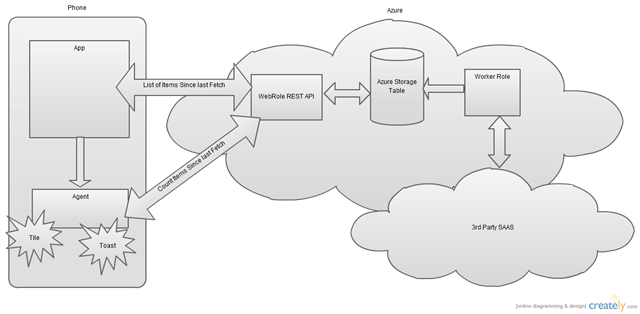
This is a continuation of the simple series. Links for other posts in the series are at the bottom of this post. Download Visual Studio Solution here .   This series explains the Windows Phone 7 requesting data from a Windows Azure web service. The phone tile and toast are supported by a background agent on the phone while the web service is supported by a continuous worker role on Windows Azure. The phone calls the WebRole REST API from both the phone app and the phone app’s background agent. Each request is different though. The App’s request is fetching a list of items to show in the app while the background agent is fetching the count of items since the last fetch and the very last item. This information will be displayed in the popup toast and the app’s start screen pinned tile.   Azure Only This post will cover the Azure web  and worker roles only. The Windows Phone 7 app-to-Azure communication will be covered in a separate post. Grab the Visual Studi...

Simple WP7 Mango App for Background Tasks, Toast, and Tiles: Code Explanation

Image
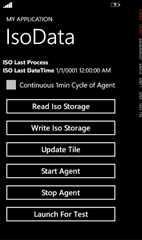
This is a continuation of this post , explaining how the sample app works. Caution : This sample isn’t meant as an example of best patterns and practices. If you see something in the code you would never do, then don’t. Solution File Organization The app has three Visual Studio Projects: the app, the agent, and the shared code library between them. One of the great things about Mango is that now the built-in Visual Studio Unit test functionality is available. By separating out the meat of the work into the SampleShared project, I can also focus my unit testing there. SampleApp1 The app has a MainPage, a ViewModel, and the WMAppManifest.xml file modified to note my ExtendedTask of BackgroundServiceAgent. The Agent is extremely simple with a call to the shared library, an update to the Tile, and a call to pop up Toast. The meat of the work is in the SampleShared library. The AgentMgr manages the background agent : add, remove, find, run now. It is only called f...